
Converting to and from Markdown#
The software used by TeachBooks, Jupyter Book, uses a dialect of markdown called MyST. The goal was to make this into content that can be edited in WYSIWYG style, such that any user can edit this in. To achieve this, we needed a way to convert this content to a rendered form in the editor, and then back to markdown.
Myst/Markdown Parser#
First, we needed a way to parse MyST content into an AST (Abstract Syntax Tree). For this we chose the MystMD parser. This parser is developed by the Jupyter Book team, for use in Jupyter Book 2, it is compatible with Jupyter Book 1, and, right now, the only option to parse MyST in Javascript. MyST outputs an abstract syntax tree that can be turned into HTML, LaTeX and more, or it can be used directly, as in our case. It can also be converted back into markdown.
Editor#
Secondly, we needed an editor that could take an arbitrary abstract syntax tree, and turn it into editable content. We found two browser editors: ProseMirror and Quill. Quill has a built-in editor bar and is more feature-packed out of the box. However, it does not support taking an abstract syntax tree, ruling it out for our project.
ProseMirror had an example on their website, which demoed conversion between ProseMirror and Markdown [Prod.b]. It was also the most flexible out of all the options: it allowed us to define our own structure for the abstract syntax tree, called the schema. We defined this schema to closely match the structure of the abstract syntax tree produced by MyST. This way the conversion between MyST and the editor would match as closely as possible, making the conversion much less complex.
To summarize, to edit the MyST source code in a WYSIWYG way, we first need to parse the MyST source code into a MyST AST. We convert this MyST AST to the ProseMirror AST. The user can then edit the document. We then convert the ProseMirror AST back into the MyST AST, which we then serialize to the new, edited MyST source.
Converting between the ProseMirror and MyST ASTs#

Figure 4.1: Comparison of MyST and ProseMirror ASTs for the text **Bold, *bold and italic***. While in MyST, text styling modifiers are nodes in the syntax tree, in ProseMirror, they are attributes on text nodes, called marks.
ProseMirror handles links, bold or emphasized text and other ‘marks’, as they are called by the ProseMirror documentation, differently than the MyST AST. Instead of having an ‘emphasis’ or a ‘strong’ node in the AST, ProseMirror has text nodes that have any number of marks (Figure 4.1).
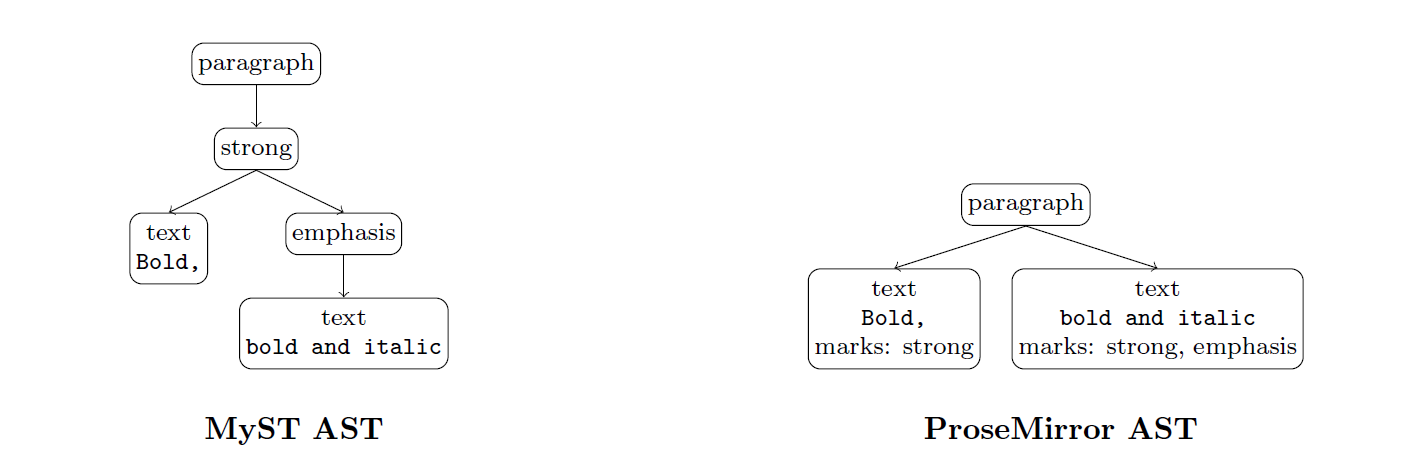
Converting from ProseMirror back to MyST is more difficult, the algorithm walks the text nodes from left to right, keeping track of where the marks start and end. If one mark contains another — like how in Figure 4.1, the ‘strong’ mark spans the first and second text node in the ProseMirror AST, while the ‘emphasis’ mark only spans the second node — the mark spanning the most text nodes becomes the parent of the other. This way, we convert the flat structure of the ProseMirror AST back into the recursive structure of the MyST AST.